

Audials AI Credits help you upscale videos in the cloud. Use them when you want to improve video resolution faster and enjoy selected movies, shows, or recordings in better quality on modern screens.
With Audials, you can record and keep your favorite videos offline. With AI Credits, you can take the next step: send videos to Cloud Upscaling and make them look sharper, clearer, and more enjoyable to watch.
What Are Audials AI Credits?
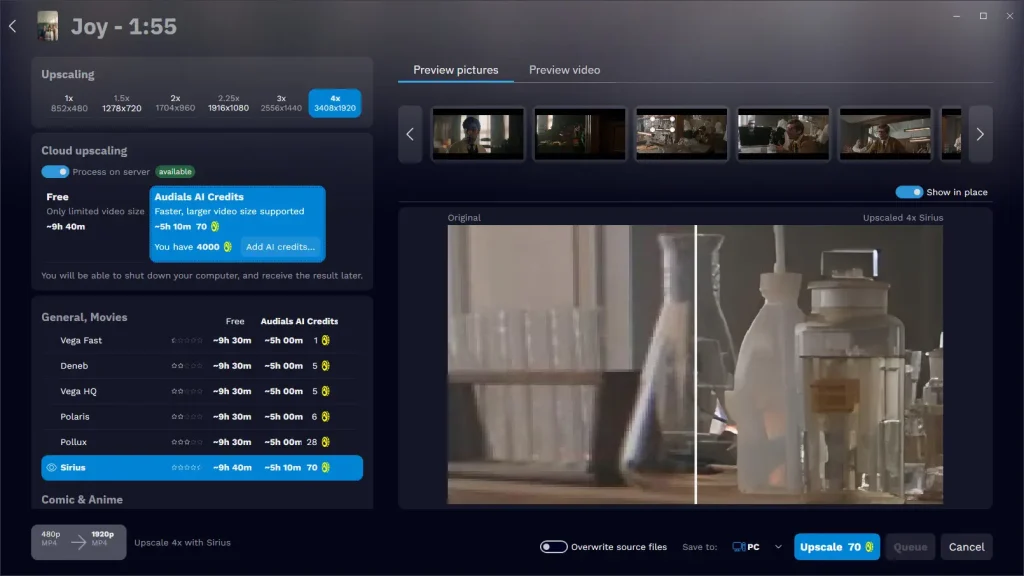
Audials AI Credits are used for Cloud Upscaling in Audials. Cloud Upscaling means that demanding AI video upscaling is processed in the cloud instead of only on your local computer.
This is useful when you want to upscale videos without relying fully on your PC’s performance. AI Credits make this faster cloud-based upscaling possible.
What Can You Do With AI Credits?
You can use AI Credits to upscale videos. That means Audials can increase the resolution of selected videos and help them look better on large TVs, monitors, and other modern displays.
Video upscaling is especially useful for older movies, saved recordings, or videos that look too soft in their original quality. The result depends on the source video, but the goal is simple: a sharper and more comfortable viewing experience.
AI Credits for Cloud Upscaling
Cloud Upscaling is the main purpose of Audials AI Credits. Instead of processing the full upscaling task only on your computer, Audials uses cloud processing.
This can help you upscale videos faster and makes AI video improvement more convenient, especially for longer movies or files you really want to enjoy in higher quality.
Why Video Upscaling Makes Your Media Better
Many videos were not made for today’s high-resolution screens. On a large display, low resolution can look blurry or compressed.
AI video upscaling helps improve that. It can make details clearer, edges sharper, and the overall image more pleasant to watch. This is useful for movie nights, archived recordings, and favorite videos you want to keep in better quality.
Use AI Credits With Audials One Pro
Audials One Pro lets you record, keep, and organize your favorite streaming content. AI Credits add cloud-based video upscaling to this workflow.
First, save the video you want to keep. Then use AI Credits for Cloud Upscaling. After that, you can enjoy your video in improved quality whenever you want.
Improve the Videos You Want to Keep
Not every video needs upscaling. Use Audials AI Credits for the videos that matter most: favorite movies, special recordings, or content you want to watch again on a better screen.
With Audials AI Credits, you can make selected videos sharper and more enjoyable — and turn your media collection into something that feels ready for today’s displays.
Your Helper for better video quality
Audials can do far more than upscaling: Convert your videos in HDR for more contrasts and vivid colors on HDR TV, make faces better visible, make movements in sports videos smoother, make 1080p videos look better on 4K screens.
